Type Bangla on your Mac with the familiar Bijoy layout. Free, open source and ready for macOS.
On a phone or tablet, tap a sample word to see how it is typed.
Complete the installer, allow the input source when prompted, then log out and sign back in.
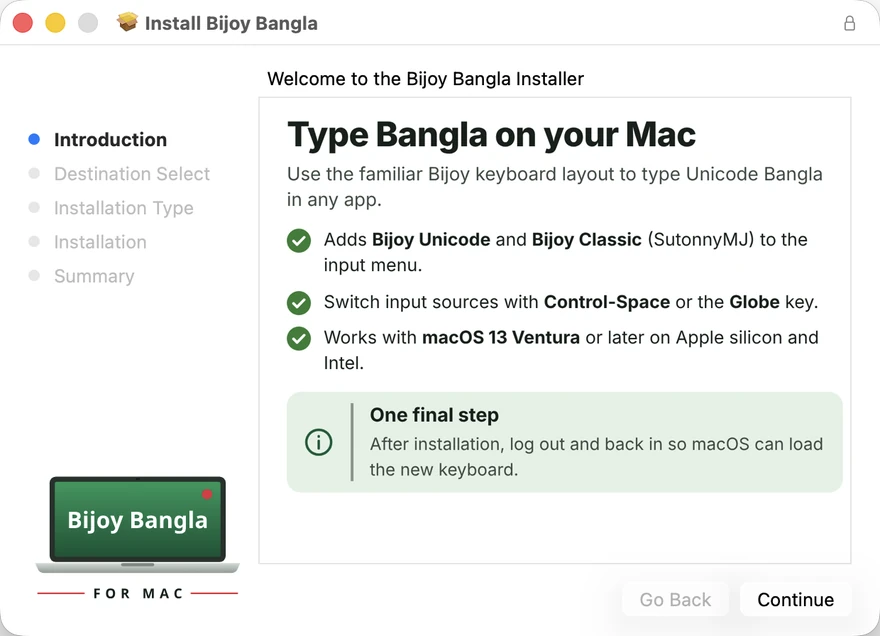
Open the installer, then select Continue.
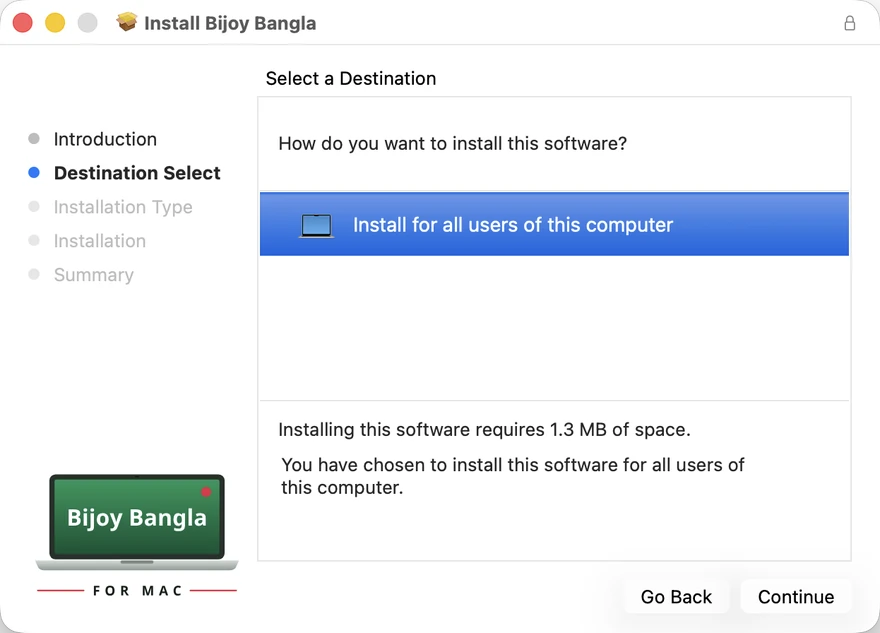
Leave “Install for all users” selected, then select Continue.
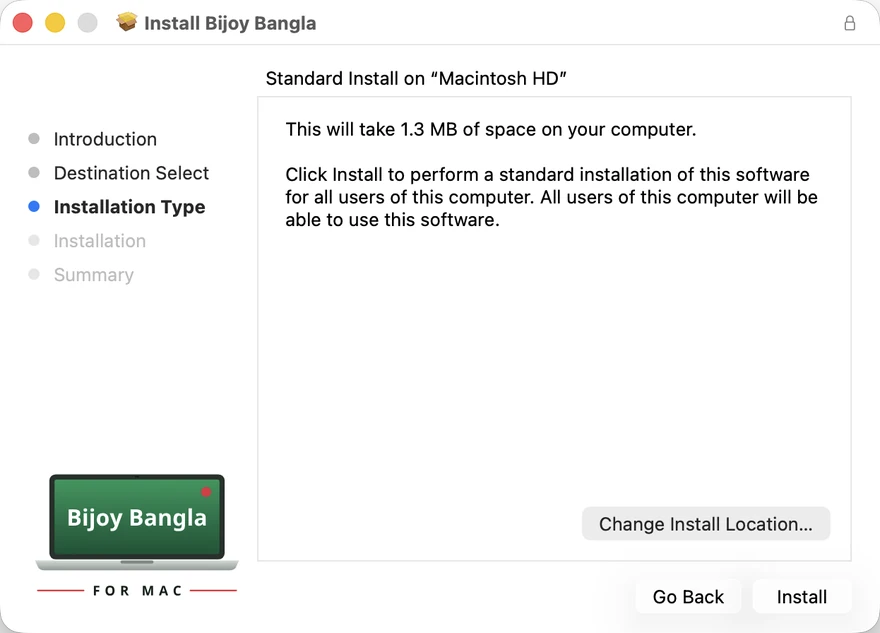
Select Install and enter your Mac password when prompted.
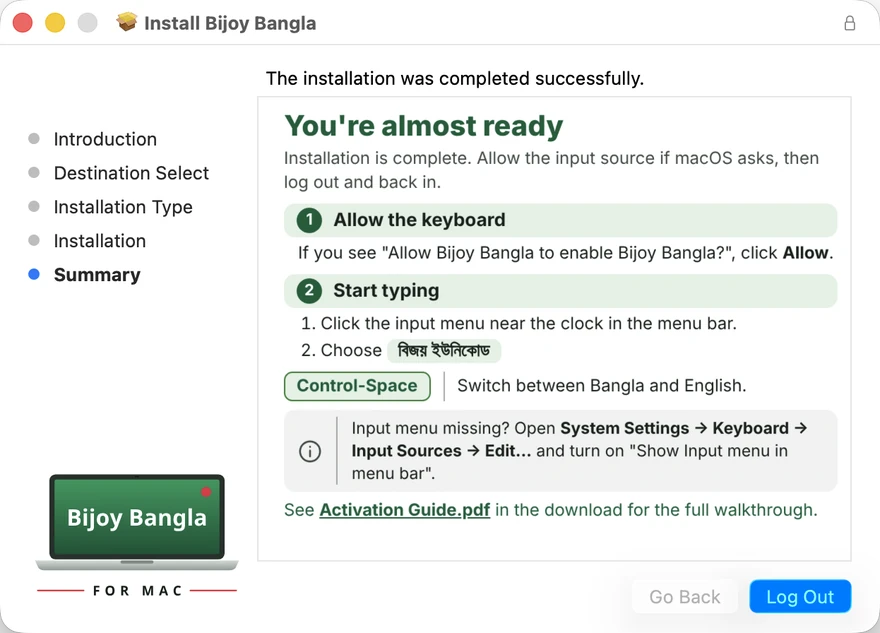
If prompted, select Allow, then choose Log Out. After signing back in, select বিজয় ইউনিকোড from the input menu.
Use the familiar Bijoy key positions. Switch between Bangla and English with Control-Space or the Globe key. To view the complete chart, open the input menu and select “Show Bijoy Keyboard Layout.”
Bijoy Bangla for Mac is a free, open-source Bangla input method for macOS, built around the familiar Bijoy layout. Type in Microsoft Word, Pages, Google Docs, Safari, Chrome, Facebook, WhatsApp, Messenger, Gmail and other Mac apps.
Choose Bijoy Unicode for standard Unicode Bangla in websites, email, social media and documents you share. Choose Bijoy Classic for classic Bijoy text used with SutonnyMJ and other MJ fonts in print and desktop-publishing workflows, including Word, InDesign, Illustrator and QuarkXPress.
Compatible with macOS 13 Ventura and later, including macOS 14 Sonoma, macOS 15 Sequoia and macOS 26 Tahoe, on Apple silicon (M1, M2, M3 and M4) and Intel Macs. The installer is signed with a Developer ID and notarized by Apple. The project is released under the MIT licence.
বিজয় বাংলা ফর ম্যাক হলো macOS-এর জন্য একটি বিনামূল্যের, ওপেন-সোর্স বাংলা ইনপুট মেথড। এতে রয়েছে পরিচিত বিজয় লেআউট। MacBook, iMac বা Mac mini-তে Microsoft Word, Pages, Google Docs, Safari, Chrome, Facebook, WhatsApp, Messenger ও Gmail-সহ বিভিন্ন অ্যাপে বাংলায় লিখুন।
ওয়েবসাইট, ইমেইল, সামাজিক যোগাযোগমাধ্যম এবং শেয়ার করা নথিতে বাংলা লেখার জন্য বিজয় ইউনিকোড ব্যবহার করুন। SutonnyMJ ও অন্যান্য MJ ফন্টে ছাপা বা ডেস্কটপ পাবলিশিংয়ের কাজের জন্য বেছে নিন বিজয় ক্লাসিক।
এটি macOS 13 Ventura ও পরবর্তী সংস্করণে Apple silicon (M1, M2, M3 ও M4) এবং Intel Mac-এ ব্যবহার করা যায়। কোনো অ্যাকাউন্ট বা বিজ্ঞাপনের প্রয়োজন নেই।
Yes. It is free to use, with no trial, account or ads. Its source code is available on GitHub under the MIT licence.
Yes. বিজয় ইউনিকোড produces standard Unicode Bangla, which is supported by browsers, Word, Pages, WordPress, Facebook and other apps that display Bangla text.
Yes. Select বিজয় ক্লাসিক from the input menu and set your document to SutonnyMJ or another MJ font. Type with the familiar Bijoy keys to produce classic Bijoy text for compatible fonts and print workflows. For websites and email, use বিজয় ইউনিকোড.
macOS 13 Ventura or later, including macOS 14 Sonoma, macOS 15 Sequoia and macOS 26 Tahoe, on Apple Silicon (M1, M2, M3, M4) and Intel Macs.
Bijoy Bangla for Mac is distributed directly from this website. Its installer is signed with a Developer ID and notarized by Apple. macOS verifies the installer when you open it.
System Settings shows diagrams for standard keyboard layouts. Bijoy Bangla is an input method that handles Bangla vowel signs and যুক্তাক্ষর, so macOS may show an information notice instead of a diagram. To view the keys, open the input menu in the menu bar and select “Show Bijoy Keyboard Layout.”
Open the input menu in the menu bar and select “Uninstall Bijoy Bangla.” Enter your Mac password when prompted, then log out and sign back in.
Please open an issue on GitHub and include the keys you pressed and the Bangla text you expected.